
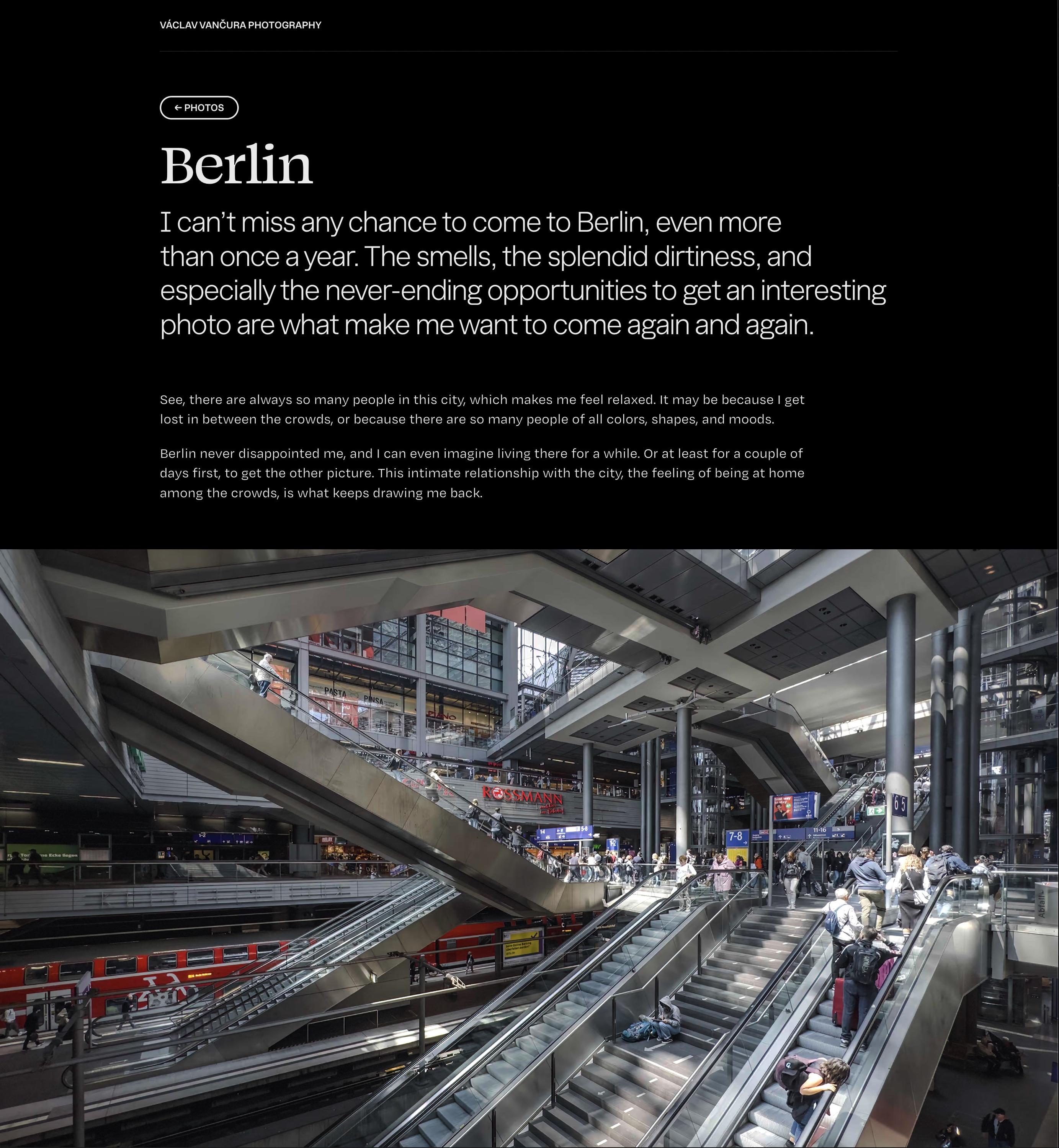
It's a national holiday here in .cz, and it's cold, rainy, and overall gloomy – plenty of good reasons to stay indoors and work on a website. So, I did just that: I finally created my own photography portfolio, though it's still quite small for now. Check it out; here's my Berlin album: https://vancura.photos/berlin

@def Thank you so much! And yeah, exactly my experience with the city: I always feel so free there.


@vancura Perhaps a nitpick, but the photos in portrait orientation are so large that they don’t fit onto my screen (16:10 and 16:9), forcing me to scroll to view the whole photo. Maybe you could set a max height based on the dynamic viewport height.
@johjakob This is a great feedback, I will look into this! Thanks a lot!
@vancura And another nitpick: Some photos exhibit pretty severe colour banding and/or compression artefacts, potentially due to them being resized by Framer. I would suggest using WebP, allowing for smaller file sizes than PNG and eliminating the need to dynamically downscale.
@johjakob The thing is WebP doesn’t support HDR gainmaps. I increased the compression to not drain my 10 GB budget too fast, but you’re right it’s too aggressive. Will fix! Thanks.
@johjakob Wait, what, the photos are served as PNG on your side? 😱
@vancura In this case, JPEG with embedded gain map is pretty good. And I think it’s unnecessary to use the full size image, nobody’s ever going to see it in full :)
@johjakob It’s problematic. From my testing, only PNGs are formats Framer doesn’t kill gainmaps in. JPEGs are basically wiped of all _more advanced_ meta data.
@johjakob I can always give up on the HDR, though I would rather not.
@johjakob Well, HDR gainmaps are still way too bleeding edge. Not even ImageMagick scales them well.
@johjakob Please, what browser do you use? I see Framer serves AVIF in Firefox, Chromium- and WebKit-based browsers.
EDIT: I can't see any banding either.
@vancura Interesting, I see PNG being served in both Safari and Zen (Firefox) on my end. No AVIF in sight
@johjakob That doesn't mean PNG is actually loaded. Go to the Network tab please.
@vancura Oh wow, it is in fact AVIF – disguised as PNG (who does that?!)
@johjakob But now I can see the banding. I have to play a bit with the compression (there's not much I can do, but for pictures with gradients it's worth it). Thanks for telling me!
@vancura And fair enough, I don’t see colour banding on my MacBook screen, only on my external display (Display P3 though). It also doesn’t show up in screenshots, so here’s a photo of what the screen displays. Super weird on probably not resolvable on your side
@johjakob Thank you so much for sharing these shots. I think I can actually fix these ones – I should make sure black in photos is never really rgb(0, 0, 0), but a bit brighter. Same as in CMYK: never use deep black for anything, or things will end badly :)
Thanks again!


@vancura Your comment made me discover CMYK blacks! Fascinating stuff, never thought of the possibility.
I ended up in this Reddit thread, where people share their favorite blacks 😆
My favorite comment is “was shocked i had to scroll this far to see 30/30/30/100”. How DARE people forget about good old 30/30/30/100
@Cykelero Haha, yeah. The fascinating world of sticky sheets of paper and grumpy old men in print shops :)
@Cykelero Thanks for the link, it’s the “sacred knowledge” level of quality. Sometimes I am sad I don’t do print anymore. But rarely so :)
@Cykelero By the way, this is one of many reasons why creating print design in Figma is a bad idea – and why Adobe still has such a strong foothold (I know Affinity has CMYK support, but there are things that only Illustrator does well, unfortunately).
@vancura Oh interesting! Makes sense, how the whole CMYK scheme requires specialized handling.

@Cykelero @vancura Ha! Fun topic. I used to use 40% cyan and 100% black for a client where their main brand colour was blue. It looked nice. I find mixing lots of plates can cause more fringing if there’s hard edges that transitions from black to white. Gotta be careful to not use too much ink, too (depends on the paper stock).